
Welcome to the wonderful world of Web Performance
sitespeed.io is an Open Source web performance tool. Run it once to debug a slow page and you get an HTML report with Core Web Vitals, a video of the page loading, the HAR waterfall and the Coach's advice on how to fix what's slow. Run it every hour against your site, ship the metrics to Graphite or InfluxDB, and you have a Grafana dashboard tracking your site's performance over time.
It's been around since 2012, it's free, you own all your data, and there's nothing to sign up for.
What tool should I use?

If you're testing a single page or a user journey and you want a full report, use sitespeed.io. It's the main tool — it pulls in everything else, supports scripting, and ships metrics to Graphite or InfluxDB so you can monitor your site over time.
If you only need timing metrics from a browser, Browsertime is the lower-level tool that powers sitespeed.io's measurement.
If you're building your own performance tooling, the Coach, PageXray, Chrome-HAR and Throttle are all standalone packages you can pull in directly.
sitespeed.io 40.0
A big release with a new look for the HTML report, a brand-new HAR waterfall, updated Coach rules for 2026, a much improved scripting API in Browsertime and Safari on iOS with HAR and video. Read the blog post to find out more.
Docker
The easiest way to run sitespeed.io is in our Docker container — it ships with Firefox, Chrome, Edge and XVFB pre-installed. Test a single URL:
docker run --rm -v "$(pwd):/sitespeed.io" sitespeedio/sitespeed.io:42.10.0 https://www.sitespeed.io/Want to test a user journey instead? Read how to write a script. And if you're new to the project, watch "Getting started with Sitespeed.io using Docker" — it walks through the basics in a few minutes.
npm
Or install globally from npm:
npm install -g sitespeed.ioMake sure you have the browser you want installed (Firefox / Chrome / Edge / Safari), then:
sitespeed.io https://www.sitespeed.io/ -b chromeWhen you're debugging a single slow page and want the fullest report, this is the command I reach for. It enables the CPU main-thread timeline (--cpu), records a video with visual metrics (--video --visualMetrics), throttles the connection to a 4G profile (-c 4g) and adds a dedicated profiling run (--enableProfileRun) so the trace overhead stays out of your measured metrics. -o opens the HTML report in your browser when the run finishes:
sitespeed.io https://www.sitespeed.io/ --cpu --enableProfileRun --video --visualMetrics -o -c 4gNot sure which flags matter? See good options to get started for the handful you'll actually use, with an explanation of each.
You can throttle the connection (connectivity guide) or run the test on a real Android phone:
sitespeed.io https://www.sitespeed.io/ -b chrome --androidYou can also test on Safari on iOS:
brew install ios-webkit-debug-proxy
brew install ffmpeg
sitespeed.io -b safari --safari.ios --video --visualMetrics https://www.sitespeed.io/
See the mobile-phones guide for the full setup.
Get the latest versions
- sitespeed.io 42.10.0 [Docker/npm/changelog/RSS]
- Browsertime 28.0.0 [Docker/npm/changelog/RSS]
- Onlinetest 2.0.0 [changelog/RSS]
- Coach (core) 9.2.1 [Docker/npm/changelog/RSS]
- PageXray 5.0.0 [npm/changelog/RSS]
- Compare 2.0.0 [npm/changelog/RSS]
- Humble 2.0.0 [changelog/RSS]
- Throttle 6.0.1 [npm/changelog/RSS]
- Chrome-HAR 1.3.1 [npm/changelog/RSS]
Contribute

We'd love your help making sitespeed.io better — code, docs, design, bug reports, or just letting us know what's missing. The help section is a good place to start, and the issue list shows what's on our plate. Thanks to everyone who has already contributed — it really does make a difference.
Google Web Vitals

We measure all three Core Web Vitals out of the box: Largest Contentful Paint, Interaction to Next Paint and Cumulative Layout Shift, plus First Contentful Paint and TTFB. Each Vital shows up in the HTML report against Google's p75 thresholds (Good / Needs improvement / Poor) so pass/fail is readable at a glance, and the visual progress chart lines them up with the filmstrip so you can see exactly where in the page load each one happened.
Read more in the Google Web Vitals documentation.
Monitor your site
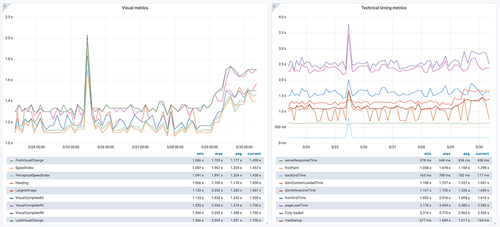
Run sitespeed.io on a schedule, ship the metrics to Graphite or InfluxDB, and watch your site's performance in Grafana. We have a Docker Compose setup that gets you a full stack — sitespeed.io, Graphite, Grafana and a set of ready-made dashboards — running in about five minutes.
There's a live version at dashboard.sitespeed.io if you want to try it before you set up your own. We've been running the dashboards for years and they really do work — read the documentation for the full guide.
What does it cost?

sitespeed.io itself is free. The only cost is the box you run it on and somewhere to store the results.
In practice that's around $500 a year on a single cloud instance (we use Hetzner) plus S3 for results — enough headroom to run a lot of tests every hour. See the cost breakdown for the full numbers.
We believe in privacy

This site, the dashboard and the compare tool all run without any tracking — no Google Analytics, no third-party scripts. None of our tools send anything back to us. You own your data.
Modern browsers can leak data of their own (Chrome and Firefox have both done it). We try to lock that down where we can, and we'd love help from anyone who spots more we can do. See our privacy notes for the full picture.
Thank you!
sitespeed.io is built on top of a lot of other Open Source work. A few of the projects we couldn't do without: